|
March 2026

Kudos to all professionals who help to make a difference in procurement and property
efficiency and effectiveness for LSU.
Procurement Policies & Procedures
|
|
|
|
LSU’s Procurement Policies & Procedures provide guidelines for university procurements
that govern all Workday campuses. Please take a moment to review the Procurement Code
policies and procedures, as there have been changes that are relevant.
Updated Procedures, Tasks and Forms
Emergency Procurements
- Created to define the procedure when an emergency arises and steps to purchase goods
and/or services required to address the emergency.
- Updated the Emergency Procurements A-Z page to link to the procedure and provide examples.
|
|
|
The Procurement A-Z index provides departmental guidance regarding how to make purchases
by commodity.
|
For all term contracts with renewal options, LSU Procurement will contact the Supplier (via Adobe Sign) requesting renewal. Upon
the Supplier’s acceptance or rejection, the Procurement Buyer and Department Contact
will be notified via Adobe Sign email. Supplier acceptance of renewal via Adobe Sign
does not guarantee contract renewal; it is upon mutual acceptance by the Department,
using the term contract process instructions. Note: there will be no PUR105 for these types of contracts.
For all term contracts with no renewal options, the department must promptly review, complete and return the PUR105 form in accordance
with the process instructions listed below. This form is required for Procurement
to initiate the applicable procurement process. Failure to return this form with a
requisition by April 14, 2026, may result in a contract lapse.
If a term contract is no longer needed, the Department should advise the appropriate
buyer by email.
|
|
|
|
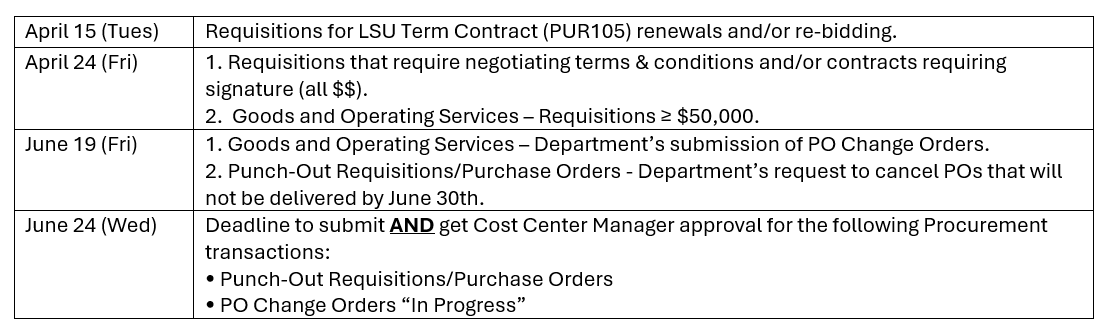
The 2025-2026 Fiscal Year Requisition Deadlines Memo has been released.
Departments are reminded to adhere to the published procurement deadlines. Goods and
services must be received and/or rendered by Tuesday, June 30th. Departments must aggressively track their FY26 purchasing transactions and perform
timely follow-up with suppliers. Departments must take into consideration the supplier’s quoted delivery times when
submitting orders for processing. It is the department's responsibility to include
the mandatory delivery deadline in the internal memo section of the requisition.
Notable Deadlines
|
|
|
Study Abroad Programs Payment & Contract Guidance
|
|
|
|
Study abroad programs 100% funded by student participation fees (SC0013) are not subject to standard Procurement or Travel policies.
For these programs:
- Deposits and advance payments may be made in accordance with the contract terms.
- Airbnb lodging is permitted. Full payment may be made at the time of reservation, with documentation
of reservation and cancellation terms retained.
- Payment methods may include cash advances, LaCarte, or direct billing.
- Ensure LaCarte spending limits are sufficient to cover trip expenses prior to departure. Temporary limit increases
can be arranged if needed.
If a study abroad program is funded by anything other than SC0013 and using a travel agent, the contract must be processed through Procurement as a Consulting (PSC-C) contract.
All Academic Programs Abroad (APA) contracts should be sent to Accounts Payable &
Travel for review.
|
|
|
Workday PSC Process Checklist
|
|
|
|
Procurement has created the Workday PSC Process Checklist to outline Workday actions
department end users should take when requesting to contract with suppliers to provide
Professional, Specialty and Consulting Services.
Please share with your departments to facilitate a smooth and timely contracting experience
for all.
|
|
|
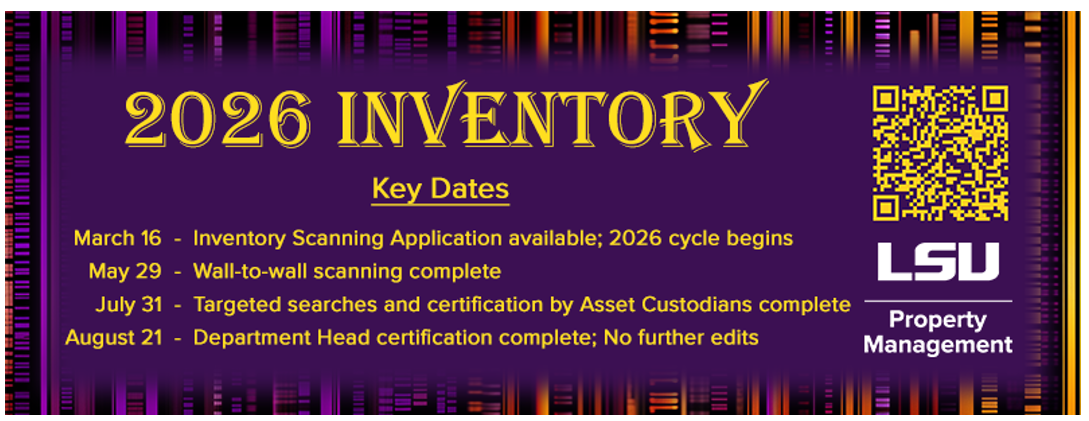
Property Management 2026 Inventory Deadlines
|
|
|
Workday Tip: Set Your Requisition Defaults
|
|
|
|
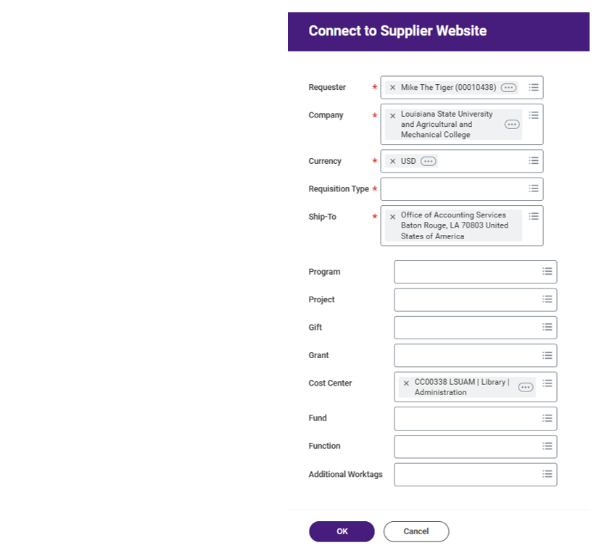
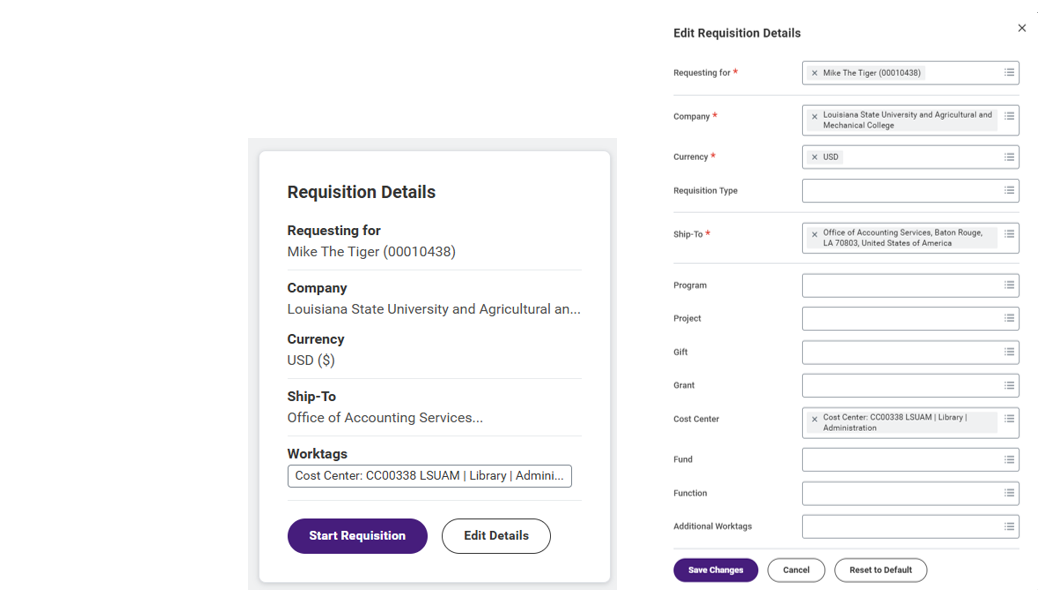
When creating a requisition in Workday, setting requisition defaults can save considerable
time.
Information provided in these fields will automatically populate respective fields
at both the header and line levels of the requisition. This helps reduce errors and
streamlines the requisition process.
When starting a requisition, required fields to proceed are noted by the red asterisk.
Most of the data defaults from the requester’s profile while the Requisition Type
is a manual selection.
It is considered best practice to select accurate order information in this step—such
as the shipping address and the driving worktag—to help avoid common Workday errors
in the checkout process.
|
|
|
View from the Purchases Worklet
|
|
|
View from the Requisition Worklet
|
|
|
Additional guidance and helpful tips can be found in the Procurement Workday Job Aids
available on the Procurement website.
Supplier Performance Scorecard & Survey
|
|
|
|
LSU Procurement values your input in managing our contracted suppliers. We’ve developed
a supplier scorecard to highlight performance strengths and areas for improvement,
which will be shared during annual business reviews.
LSU Procurement will collect response data for each supplier via Qualtrics surveys.
Links will be emailed to campus users/stakeholders and posted on the LSU Procurement
website. Data collection will occur from April to mid-June.
|
|
|
Prompt Payment Terms/Early Payment Discounts
|
|
|
During Fiscal Year 2026 YTD (7/1/2025 – 2/28/2026)
LSU departments have retained $180,614.43 in their budgets by promptly receiving and paying invoices.
Since being enabled in Workday (5/1/2021 – 2/28/2026)
LSU departments have retained $853,618.13 in their budgets by promptly receiving and paying invoices.
Approximately $344,711.73 was lost by not paying within the prompt payment/early payment discount timeframe.
Best Practice Reminders
- Suppliers should be sending invoices directly to LSU Accounts Payable & Travel at
aptravel@lsu.edu.
- If Suppliers are sending invoices to department end users, it drastically reduces
the opportunity for the invoice to get reviewed, transferred to Accounts Payable,
loaded into Workday and paid within the prompt payment term timeframe.
- Departments are reminded to review deliveries and approve/process LSU master contract
and Workday B2B catalog supplier invoices timely.
Suppliers Offering Prompt/Early Payment Discounts
Departments are reminded that the following LSU master contract and Workday B2B catalog
suppliers offer prompt payment terms and early payment discounts:
- Airgas (1% 10, Net 30)
- Avantor delivered by VWR (3% 30, Net 30)
- Cintas (2% 15, Net 30)
- Fisher Scientific (2% 10, Net 30)
- Forty Nine Degrees (2% 10, Net 30)
- Genuine Parts Co. dba NAPA Auto (1% 10, Net 30)
- Grainger (2% 10, Net 30)
- HD Supply (2% 10, Net 30)
- Medline Industries (1% 10, Net 30)
- ODP Business Solutions (1% 15, Net 30)
- Staples Business (1% 10, Net 30)
- Steelcase via Frost Barber of LA (2% 10, Net 30)
- Thomas Scientific (1% 10, Net 30)
Note: Suppliers with newly added payment terms in bold above.
|
|
|
Updates to Workday Requisition & Purchase Order Types
|
|
|
|
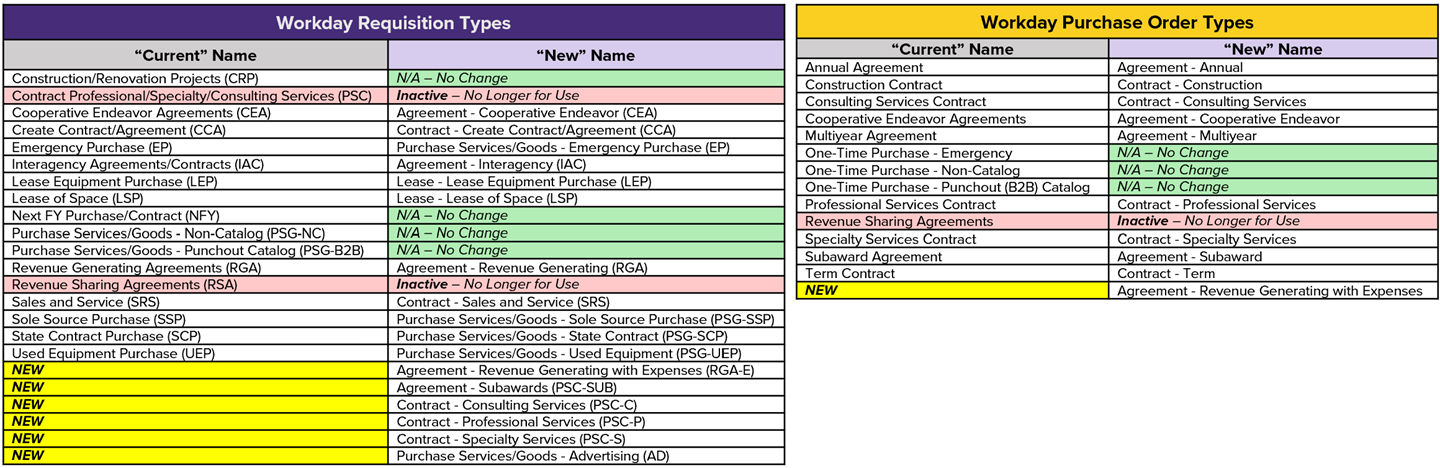
In an effort to streamline operational processes (both end user and Procurement),
Workday validations, and improving system-wide reporting, we've updated Requisition
(RQ) and Purchase Order (PO) Types. The charts below show the “Current” vs. “New”
names for RQ & PO Types while also indicating any RQ Types or PO Types that will be
inactivated for newly created ones. While some updates are only related to the naming
for consistency and ease of searching/reporting, we are also adding some new RQ &
PO Types.
|
|
|
|
For more information on spend attachment categories and their related definitions,
validations, and use cases, visit:
|
|
|
New Workday Requisition Type & Questionnaire for Advertising Purchase Orders
|
|
|
|
The "Purchase Services/Goods - Advertising (PSG-AD)"requisition type was created to
streamline operational processes for both the end user as well as Procurement. This
change is said to improve system-wide reporting, clearly outline Workday validation
criteria relative to advertising purchases, and aid in the review and processing of
transactions.
Parameters for using the advertising requisition type
- Must be a Non-Catalog Requisition
- Must be on a "Goods" line
- Must use spend category: Advertising (SC0002)
- Must use a commodity code (4th level) within the Advertising family of UNSPSC codes
(82100000)
- 3rd level codes to search in the Workday "Commodity Code Lookup Tool"
- Print Advertising (82101500)
- Broadcast Advertising (82101600)
- Aerial Advertising (82101700)
- Advertising Agency Services (82101800)
- Media Placement & Fulfillment (82101900)
Advertising Questionnaire (Requisition)
- What is the purpose of this advertisement?
- Explain the need & purpose of the advertisement and list/name the specific project,
event, promotion, or employment this advertisement is for.
- Supplier Contact Name
- Supplier Contact Email Address
- Supplier Contact Phone Number
|
|
|
New Workday Spend Attachment Category - SAM.gov Documentation
|
|
|
|
Currently there is a Workday warning message (gold color) on Procurement transactions
using accounting funds FD110, FD250, FD251, and FD252. The warning message states
“Federal or federal pass thru funds being utilized. POL-U501.A applies. Attach SAM.GOV
documentation in order to proceed.”
Effective, May 1st this Workday warning message will become a Workday critical validation
message (red color) to ensure there is an attachment on the Procurement transaction
using the spend attachment category “SAM.gov Documentation.” If the applicable document
is not attached to the Procurement transaction, the transaction cannot proceed until
the validation is met by attaching the required document.
|
|
|
New Contracts

- Lowe’s Home Centers
- New contract fully executed.
- Providing access to building materials, MRO/facilities, and janitorial supplies and
equipment.
- Workday punchout (B2B) catalog tentatively scheduled to launch July 1, 2026.

- MWI Animal Health
- New contract fully executed.
- Providing access to veterinary supplies, equipment, and pharmaceuticals.
- Workday punchout (B2B) catalog tentatively scheduled to launch July 1, 2026.
New Workday Punchout (B2B) Catalogs

- B&H Photo
- New catalog/user interface is now live in Workday (re-launched March 12, 2026)
|
|
|
-
Departments are generally not authorized to sign contracts on behalf of the university.
Only individuals with delegated signature authority from the Chief Procurement Officer
may execute procurement agreements. Submitting an agreement that has already been signed by a department may delay receipt
of goods and/or services.
-
Departments are reminded that several types of goods and/or services purchases require
a special authorization is obtained regardless of cost and method of payment (PO,
LaCarte or Direct Charge). Prior approval(s) as indicated on the Special Authorizations List webpage must be obtained before the purchase is made and attached to the transaction (Requisition,
Expense Report or Direct Charge form) prior to submission to Procurement or Accounts
Payable & Travel.
-
Departments should coordinate with their internal HR contact prior to engaging anyone
as a contractor and avoid initiating supplier setup or purchase requisitions until contractor eligibility
has been confirmed by HRM.
-
Active employees are encouraged to be compensated through payroll for services rendered
to their department that are deemed outside their job duties or to other system departments/campuses.
Individuals should not register as suppliers unless otherwise approved to do so prior
to completing the application.
|
|
|
Procurement Training Sessions
|
|
|
|
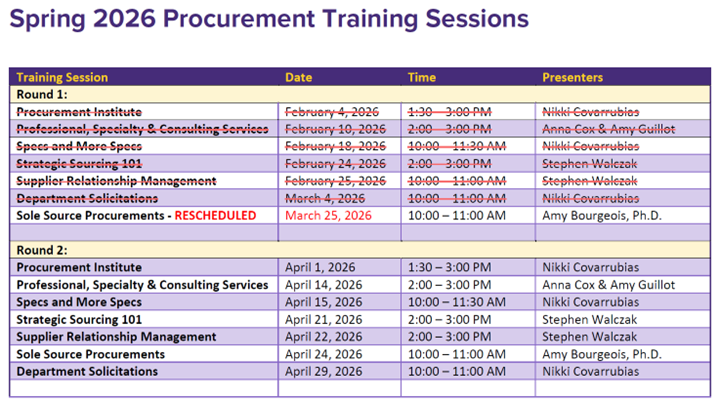
Procurement offers training sessions twice each semester for faculty, staff, and students
who are involved in initiating or approving procurement transactions. These sessions
are open to all system employees, not just those pursuing purchase agent delegation.
|
|
|
|
Whether you're new to procurement or just need a refresher, we welcome participants
from all system campuses. Come learn, ask questions, and feel more confident navigating
procurement processes!
If you are interested in additional training not currently offered, please email LSU Procurement at purchase@lsu.edu.
|
|
|
Workday Resources - Procurement & Suppliers
LSU Procurement has created the following resources to assist LSU departments in their
day-to-day operations within the Workday Procurement module.
|
|
|
|
Updates - Procurement Functionality
A running update of new or updated functionality relating to the Procurement/Supplier
module of Workday. Updates posted may be related to new functionality, new reports
for end users, announcing new punch-out (B2B) catalog suppliers, and/or new validations
requiring certain actions to be taken.
|
|
|
|
|
Procurement FAQs
A list of commonly answered questions related to Procurement in Workday (i.e., how
to request a new/update Ship-to Address, how to cancel a PO, when do I need a receipt,
etc.).
|
|
|
|
|
Mass Cleanup Actions
A schedule of Procurement initiated mass close/cancel actions with corresponding dates.
|
|
|
|
|
Spend Attachment Categories
A list of attachment categories used on requisitions and purchase orders with their
definitions and related validations.
|
|
|
|
|
UNSPSC Commodity Codes
An explanation of UNSPSC commodity codes, related training materials (presentations
& job aids with commodity code cheat sheet), and a web form to report a missing or
unknown commodity code for a purchase.
|
|
|
|
|
Finance (FIN) Training Materials
Training materials (job aids) created across all LSU Finance departments (Procurement,
Suppliers, Accounts Payable, Budget & Planning, etc.).
|
|
|
|
|
|
|
If you have an item you’d like to see included in a future edition of Procurement
Update, please email your suggestion to purchase@lsu.edu.
|

